Businesses with a complete Google Business Profile (GBP) enjoy up to 70% more customer interactions than incomplete ones.
Yet, many businesses fail to optimize their profiles fully, leaving critical gaps that diminish visibility and reduce engagement.
These missed opportunities can hold back your ability to rank higher in local search results.
This guide explores how a complete Google Business Profile boosts local SEO, helping you attract customers and grow your business effectively.
1. Why a Complete Profile Is Essential for Local SEO
A complete Google Business Profile helps customers and Google trust your business. Missing or inconsistent details make it hard to rank in local searches. This reduces your visibility and makes it harder for people to find you.
Key Benefits of a Complete Profile
Better Rankings: Google favors businesses with accurate and complete information.
Customer Trust: Detailed profiles reassure customers and build credibility.
Higher Engagement: Profiles with photos, reviews, and full descriptions attract more clicks, calls, and direction requests.
Without a complete profile, you risk losing out to competitors who have optimized their profiles.
2. Key Components of a Complete Profile
a. NAP Consistency
NAP stands for Name, Address, and Phone Number. These details must be everywhere—on your website, social media, and directories. Inconsistent information confuses customers and hurts your rankings.
b. Add High-Quality Photos
Photos make your profile more engaging. Use clear pictures of your storefront, team, and products. Profiles with photos see 42% more direction requests and 35% more website clicks.
c. Choose Accurate Categories
Select a category that describes your main business activity. Add secondary categories to cover additional services. For example, a coffee shop could list “Cafe” as the main category and “Bakery” as a secondary one.
d. Update Business Hours
Make sure your hours are accurate, including holidays. This helps customers know when they can visit or call.
e. Write a Clear Business Description
Explain what your business offers and what makes it special. Use simple, relevant keywords to help Google match your profile to local searches.
3. How a Complete Profile Improves SEO Rankings
a. Makes Your Business Relevant
Google matches your profile with local searches. A complete profile ensures your business shows up when people look for your services.
b. Encourages Customer Engagement
Features like photos, reviews, and updates attract more clicks, calls, and visits. This activity signals to Google that your business is active and valuable.
c. Helps You Get into the Local Pack
Profiles with accurate information are more likely to appear in the Local Pack. This is the group of three top results Google shows for local searches. Being in the Local Pack boosts your visibility and traffic.
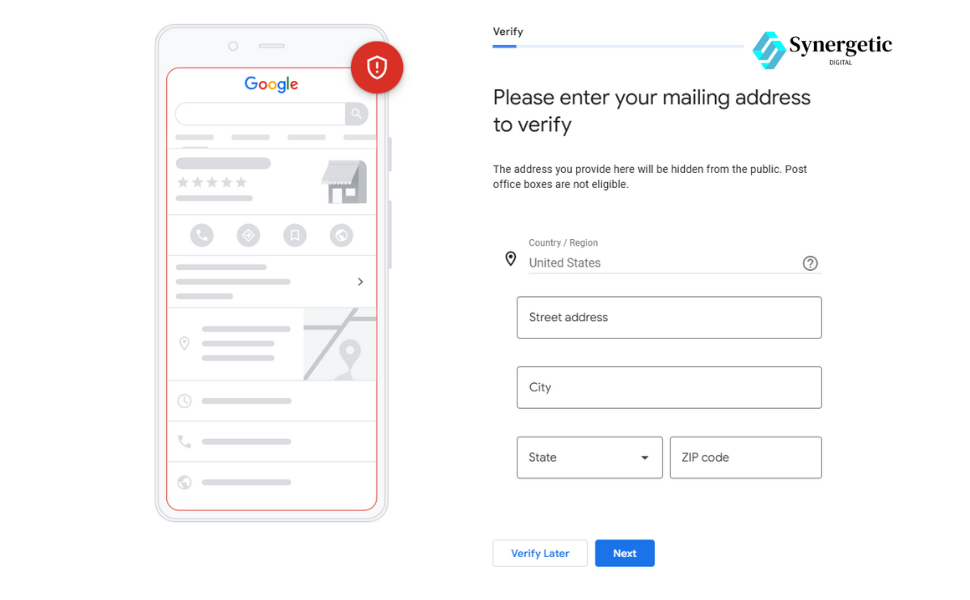
Claiming your profile gives you control over your business information. Verified profiles are more likely to rank higher and gain customer trust.
b. Post Regular Updates
Share updates, promotions, and events using Google Posts. This keeps your profile active and engaging.
c. Respond to Customer Reviews
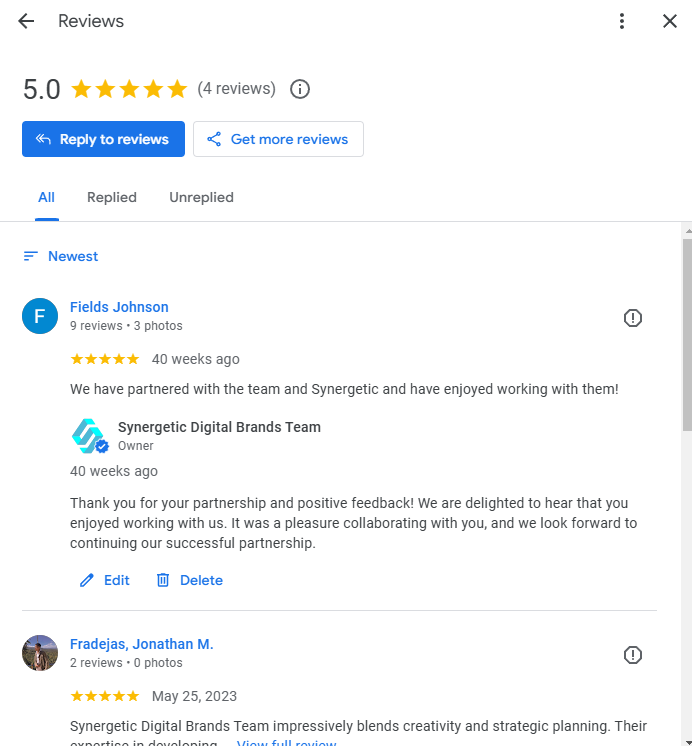
Encourage customers to leave reviews and reply to their feedback. Responding to reviews shows you care about your customers. It also builds trust and improves rankings.
d. Use the Q&A Section
Answer common customer questions in the Q&A section. This helps customers get the information they need quickly.
5. Avoid Common Profile Mistakes
a. Leaving Sections Blank
Incomplete profiles rank lower. Fill out every section, including details like accessibility features or pet policies.
b. Ignoring Reviews
Not responding to reviews can hurt your reputation. Reply to both positive and negative reviews to show you value feedback.
c. Inconsistent Information
Make sure your business details are consistent across all platforms. Regularly check your NAP details and update them as needed.
6. The Role of External Directories in Local SEO
External directories like Yelp, Yellow Pages, and Bing Places enhance your online presence. Ensure your business information matches your GBP across these platforms.
Check out this Local SEO guide for more insights on managing external directories.
7. Track and Measure Your Performance
Use Google My Business Insights to monitor your profile’s effectiveness. This tool provides data on how customers find and interact with your business.
Key Metrics to Track
Search Queries: Discover what keywords customers use to find your profile.
Customer Actions: Track how many people click, call, or request directions.
Photo Views: Analyze how your visuals perform and update them if needed.
Use these insights to refine your strategy and maximize your profile’s impact.
Conclusion
A complete Google Business Profile is vital for improving your local SEO and increasing customer engagement. Ensuring your profile includes accurate details, high-quality visuals, and active engagement features creates a foundation for long-term growth.
Focus on completing your Google Business Profile, ensuring consistent NAP details, encouraging reviews, and adding high-quality photos. Engage with customers regularly through posts and Q&A.
Optimize your Google Business Profile, ensure NAP consistency, gather positive reviews, and list your business in external directories like Yelp or Bing Places.
Complete all sections of your profile, post regular updates, and respond to customer reviews. Use insights to track performance and refine your strategy.
Ensure your profile is complete and accurate. Add high-quality photos, maintain consistent business information, and actively engage with reviews and questions.
Any business serving a specific geographic area can benefit from local SEO, including restaurants, retail stores, service providers, and healthcare facilities.
Start by claiming your Google Business Profile, ensuring NAP consistency, and adding accurate business details. Focus on collecting reviews and building local directory listings.
Yes, local SEO remains critical for businesses wanting to attract customers in their geographic area. It helps small and medium businesses compete in search results.
Did you know that businesses with an optimized Google My Business (GMB) profile are twice as likely to be considered reputable by potential customers?
However, despite this opportunity, many local businesses fail to fully optimize their profiles, missing out on valuable visibility and customer engagement. If you want to attract more local customers, now is the time to ensure your Google My Business profile is fully optimized.
This guide will show you how to optimize your Google My Business listing, making it easier for customers to find your business and improving your search engine ranking.
1. Claim and Verify Your Google My Business Profile
Before you can optimize your profile, you need to claim and verify it. This step is essential for controlling your business listing and updating your information.
Claim your profile: Sign into Google and search for your business. If you haven’t claimed it yet, click “Claim this business.”
Verify your profile: Google will send a verification code to your business address. Enter the code to confirm that your business is legitimate.
Verifying your profile ensures you have control over your business listing and allows you to make updates to improve its performance.
Google values complete profiles, so filling out every section of your Google My Business listing is essential. A fully completed profile makes it easier for customers to find your business in local searches. Here’s what you should focus on:
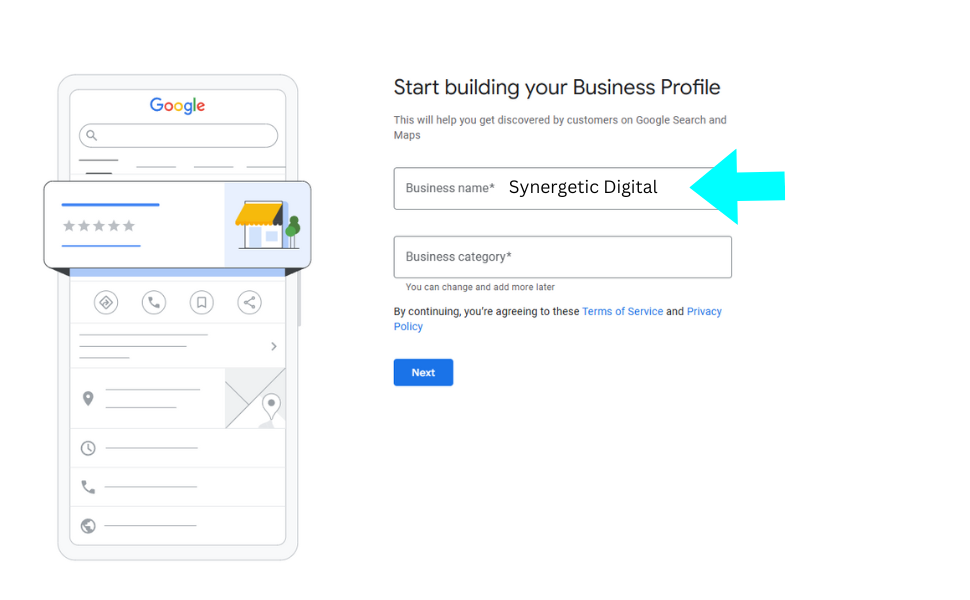
Business Name: Ensure your business name is consistent with what you use on your website and other online directories.
Address and Phone Number (NAP): Accuracy is key here. Your address and phone number should match across all platforms.
Business Hours: Update your hours regularly, particularly for holidays or special events.
Website Link: Provide the URL to your business website so customers can learn more about what you offer.
Business Categories: Choose the most appropriate categories to ensure your business is listed in the right search results.
Ensuring every section is filled out properly makes it easier for potential customers to find your business.
If you want to explore optimizing your Google Business Profile further, check out how a complete profile boosts your local SEO rankings.
3. Upload High-Quality Photos and Videos
Visual content is a game-changer when it comes to attracting customers. Businesses with photos get 42% more requests for directions and 35% more website clicks.
Here’s how you can optimize your visual content:
Upload Photos: Show your business at its best by uploading high-quality images of your storefront, products, staff, and services. Photos are one of the first things customers see when they find your profile.
Add Videos: Short videos, like customer testimonials or demonstrations, can increase engagement.
360-Degree Photos: Offering a virtual tour of your business gives potential customers an interactive way to explore your space before visiting.
Consistently updating your photos ensures your profile remains fresh and relevant.
To learn more about optimizing your photos for better SEO, Google’s official guidelines offer valuable insights.
4. Encourage and Respond to Customer Reviews
Customer reviews are critical for both building trust and improving local rankings. Here’s how you can leverage reviews to improve your profile’s performance:
Ask for Reviews: After a transaction or service, kindly request reviews from happy customers. Make it easy by sending them a direct link to leave feedback.
Respond to Reviews: Always acknowledge positive reviews and address any negative feedback with professionalism.
Use Keywords in Review Responses: When replying, include relevant keywords naturally. For instance, if you own a coffee shop, mention “fresh coffee” or “friendly service” to boost visibility.
The more reviews you have, the more likely your business is to rank higher and attract customers.
Google’s support page has useful information on managing and responding to reviews effectively.
5. Post Updates Regularly
Google Posts are a great way to share updates, promotions, and news with potential customers. Consistent posting keeps your profile fresh and shows Google that your business is active. Here’s how to make the most of it:
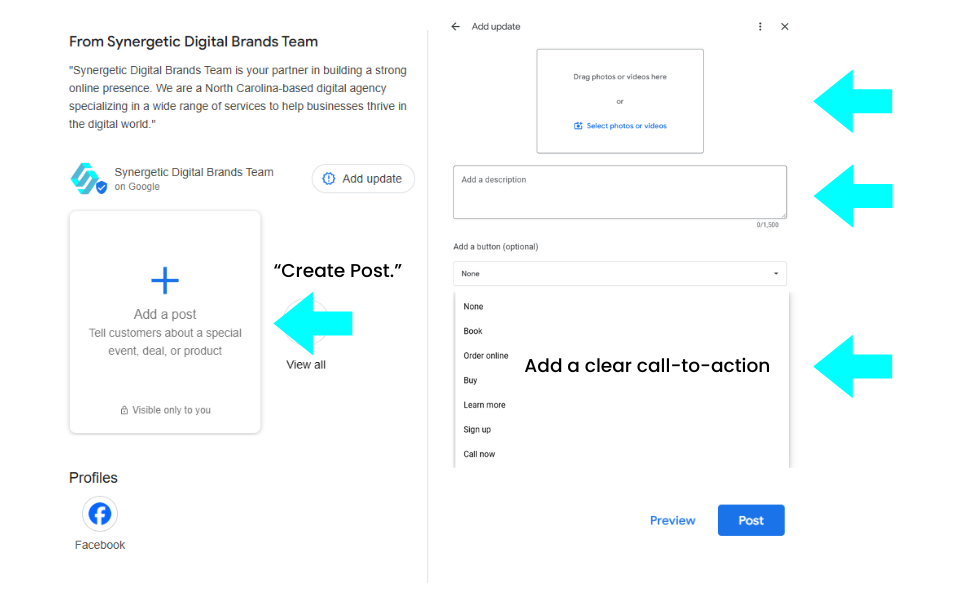
Create Posts: Go to your GMB dashboard and click “Create Post.” Add a clear call-to-action such as “Learn More” or “Book Now.”
Use Visuals: Adding images or videos to your posts helps them stand out and attracts more attention.
Share Offers and Events: Promote special deals or events directly on your GMB profile to engage customers.
By posting regularly, you increase your profile’s visibility and attract more interactions.
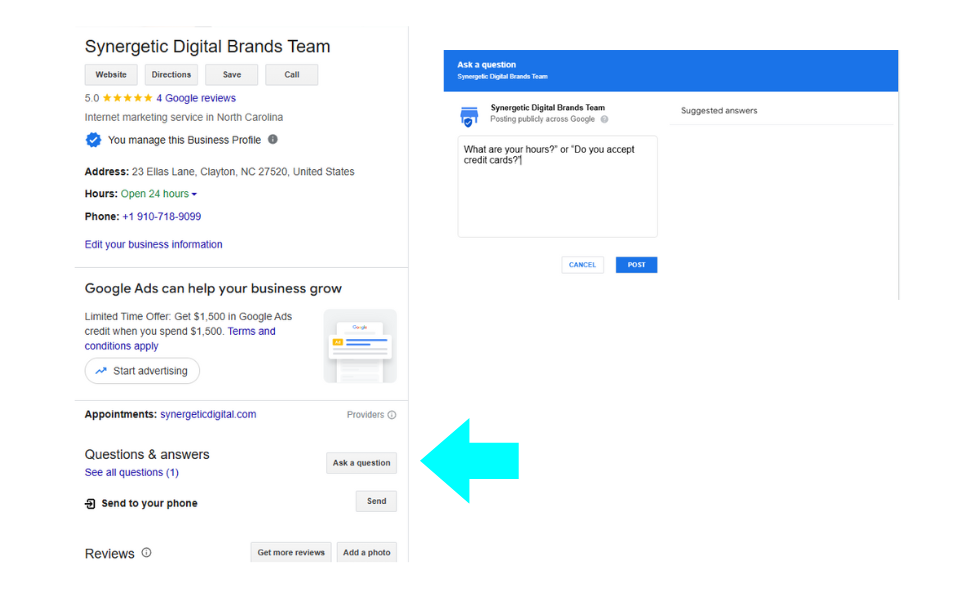
The Q&A section is often overlooked but can be a great tool for engaging potential customers. Here’s how to optimize it:
Preload Common Questions: Add answers to frequently asked questions, such as “What are your hours? ”“Do you accept credit cards? ”
Encourage Questions: Let customers know they can ask questions directly on your profile.
Respond Quickly: A fast response shows that you care about customer feedback and are actively engaging with your audience.
This section not only provides valuable information to potential customers but also boosts your profile’s completeness. To get more out of the Q&A section, Google’s help center explains how to manage and optimize this feature.
7. Monitor Performance with Google Insights
Google My Business provides powerful analytics tools through Google Insights. These insights help you understand how customers are interacting with your profile. Here’s what you should monitor:
Search Queries: Find out which search terms are bringing customers to your profile.
Customer Actions: See how many people visit your website, request directions, or call your business.
Photo Views: Keep track of how often your photos are viewed to ensure your visual content is resonating with customers.
By using this data, you can refine your strategy and improve your profile’s performance.
For a deeper understanding of how to use insights, Google Analytics offers additional tools to track and refine your business strategy.
8. Maintain an Active Profile
Google favors active businesses, so it’s essential to keep your profile up-to-date:
Update Business Hours: Ensure your hours accurately reflect holiday or special hours.
Post Regularly: Consistent updates will keep your profile fresh and engaging.
Respond to Reviews and Questions: Quick replies show customers you’re engaged and care about their feedback.
An active profile helps your SEO and assures customers that your business is open and ready to serve them.
Explore how keeping your profile fresh can improve rankings and engagement.
Conclusion
Optimizing your Google My Business profile is essential for boosting local SEO, increasing your visibility, and attracting more customers. You ensure that your business stands out by claiming and verifying your business, completing every section, uploading photos, responding to reviews, and staying active. Regular updates and performance monitoring will keep you ahead of the competition.
Start optimizing your Google My Business profile today, and watch your local presence grow.
46% of all Google searches are looking for local information.
Think about that for a second…
That means nearly half of Google’s daily queries—millions of them—are people searching for businesses just like yours.
Yet, despite the potential to attract more visitors to Google Business Profile, many businesses need help to turn their Google Business Profile (GBP) into a traffic magnet.
Why? because they’re not optimizing it correctly.
But you’re not here to make the same mistake.
You’re here to take your GBP to the next level and drive steady foot traffic and website clicks.
Whether it’s mastering the art of Google Posts, responding to reviews, or refining your profile details, we’re about to dig into actionable strategies that can transform your GBP into a powerful tool for business growth.
Let’s dive in if you’re ready to attract more visitors, stand out from the competition, and boost your bottom line.
Why You Need to Attract More Visitors to Google Business Profile
More than just a digital business card, a well-optimized Google Business Profile is essential to build a connection with your audience. Here’s why focusing on attracting more visitors to your GBP should be a priority:
Boosts Local Search Visibility
An optimized GBP increases your chances of appearing in Google’s “Local Pack”
(the top three local business results), making it easier for customers to find you.
Enhances Customer Trust
A profile with detailed information, positive reviews, and high-quality photos appears more credible, helping build trust and establish a solid first impression.
Drives More Engagement
An active GBP can lead to more calls, website visits, and in-store traffic, directly impacting your bottom line.
Advanced Strategies to Attract More Visitors to Google Business Profile
Do you want more people to see your profile?
Follow these tips to boost your GBP and attract more visitors.
1. Complete Every Detail of Your Business Profile
The basis of successful optimization is ensuring that your Google Business Profile contains all of the necessary information. Simple as it may seem, more than adequate profiles frequently cause problems.
Business Name, Address, and Phone Number (NAP)
Your NAP information should be the same on all online sites, like your website, social media accounts, and local directories. Search engines like Google can get confused by mistakes that hurt your results.
Business Description
When writing an interesting business description, focus on what makes your business unique. Use the main keywords, but keep it natural. For instance, if you run a fitness center, stress the services you offer, such as “24/7 access gym,”“personal training,” or “yoga classes.”
Service Areas and Attributes
To improve visibility in local searches, list relevant attributes like “women-owned,” “free parking,” or “pet-friendly,” along with your service areas.
Categories and Services Offered
Select the most relevant business subcategories and category overall. Provide a detailed list of your services, including any expertise. This helps Google better understand your business and displays your profile in more relevant searches.
2. Use Google Business Posts to Drive Traffic and Engagement
Google Business Posts lets you interact personally with possible clients.
Consider them short updates, like social media posts, that show what’s going on in your business.
Create Regular Updates
Consistent posting signals to Google that your business is active and thriving. Share promotions, new product launches, or upcoming events to attract attention.
Include Eye-Catching CTAs (Calls-to-Action)
To drive interaction, use action-oriented phrases like “Book Now,” “Contact Us,” or “Learn More.”
Utilize High-Quality Visuals
Posts with images or videos tend to get more engagement. If you’re a bakery, share mouth-watering photos of fresh pastries or highlight a seasonal menu item.
Regularly updating your Google Business Posts keeps your profile fresh and encourages visitors to engage more with your business.
3. Leverage Customer Reviews and Responses for SEO and Engagement
Reviews are a cornerstone of your Google Business Profile. They provide social proof and can influence a potential customer’s decision.
Encourage Satisfied Customers to Leave Reviews
Share a direct link via email, SMS, or on your website to make it easy for customers to leave a review.
Respond to All Reviews
Acknowledge positive feedback and address negative reviews constructively. For example, “Thank you for your feedback! We’re glad you enjoyed your meal and look forward to serving you again soon.”
Include Keywords in Review Responses
Use relevant keywords naturally in your responses to increase the SEO value of your GBP. For example, if you run a yoga studio, mention terms like “yoga classes,” “meditation sessions,” or “fitness classes.”
Responding to reviews promptly and professionally builds trust and encourages more engagement, which can lead to better rankings and increased visibility.
4. Optimize Visual Content to Create a Memorable Impression
High-quality visual content—photos, videos, and 360-degree virtual tours—can make your Google Business Profile more engaging.
Use High-Resolution Photos and Videos
Include images of your storefront, interior, products, team members, and anything that showcases your business. If you’re a restaurant, include pictures of popular dishes, happy customers, and your team in action.
Add a Virtual Tour
For physical locations, consider adding a virtual tour. This helps potential customers get a feel for your space before visiting.
Optimize with Relevant Keyword
When uploading images, use keyword-rich file names and descriptions. For example, instead of “IMG1234.jpg,” use “downtown-bakery-exterior.jpg.”
Visual content helps your business stand out and provides additional context, encouraging more visitors to explore your profile.
5. Optimize the Q&A Section with Preloaded FAQs
The Q&A section on your Google Business Profile is a goldmine for answering potential customers’ questions before they contact you.
Add Preloaded Questions and Answers
Anticipate common customer queries and answer them proactively. For example, if you’re a hair salon, you might include, “Do you accept walk-ins?” or “What’s your policy on late arrivals?”
Encourage Customers to Use the Q&A Section
Let your customers know they can ask questions directly on your profile. The more questions and answers your profile has, the more comprehensive it appears to visitors.
Use Keywords in Q&A Responses
Like with reviews, using relevant keywords in your Q&A responses can help improve visibility in search results.
By managing this section proactively, you can address common concerns and provide valuable information that might go unanswered.
6. Utilize Google My Business Insights to Optimize Your Strategy
Google My Business Insights offers a wealth of data on how users find and interact with your profile. Use this information to refine your strategy.
Analyze Search Queries
Find out exactly which search terms people are using to discover your profile. Are they looking for “family-friendly restaurants” or “best Italian food near me”? Use this information to update your profile description, services, and even Google Posts to align with these keywords better.
Monitor Customer Actions
Track how many people click on your website, request directions, or call your business straight from your GBP. Are you seeing a drop in website visits? Consider tweaking your website link or making your call-to-action clearer in posts.
Adjust Content Based on Insights
If you notice your photo views are low, it might be time to update your visuals. Fresh, high-quality images can breathe new life into your profile. Are your posts not getting much engagement? Experiment with different content topics or add a video to catch your audience’s attention.
Regularly reviewing your GBP insights helps you understand what’s working and what isn’t, allowing you to optimize your profile based on real data.
Bonus Strategies: Boosting Visibility and Engagement through External Marketing Channels
1. Embed Your Google Business Profile on Your Website and Social Media
Use Website Widgets and Plugins
Embed your Google Business Profile on your website for easy access. Consider placing it on your contact page or footer.
Share Your Profile on Social Media
Include your GBP link in your social media profiles and share it in relevant posts.
2. Create Hyper-Localized Content to Drive Traffic
Write Localized Blog Posts
Create blog posts that target local events, news, or community topics and include links to your GBP.
Publish Social Media Content with Local Focus
Share local partnerships, events you’re involved in, or customer stories that mention your location.
3. Run Local Google Ads Campaigns to Promote Your GBP
Use Location Extensions and Ad Copy
Incorporate your GBP in Google Ads campaigns. Use location extensions and write ad copy that directs users to your GBP for more information.
Target Keywords and Areas Specific to Your Location
To attract relevant traffic, focus on keywords related to your business category and location.
These external strategies amplify your GBP’s reach and drive more visitors to your profile.
Common Mistakes to Avoid When Optimizing Your Google Business Profile
Incomplete Profile Information
Missing details such as business hours, services, or attributes can lower your chances of appearing in relevant searches.
Ignoring Negative Reviews
Not responding to negative feedback can damage your reputation. Address every review professionally.
Outdated Information
Ensure your profile information, especially business hours and contact details, is always accurate.
Avoiding these common pitfalls will help maintain a positive online presence and keep your profile competitive.
Frequently Asked Questions
How often should I update my Google Business Profile?
Update your profile whenever there are changes to your business information or at least once a month to keep your profile active.
What type of content works best for Google Posts?
Promotions, events, new products or services, and customer testimonials are highly effective.
How do I verify and claim my Google Business Profile?
Depending on your business type, verification can be done via email, phone, postcard, or Google Search Console.
Can I manage multiple locations under one Google Business Profile?
Yes, multiple locations can be managed under one account. Each location will appear as a separate listing but can be managed from a single dashboard.
Take Your Google Business Profile to the Next Level
Optimizing your Google Business Profile is an ongoing process that requires regular updates and strategic planning. By implementing the advanced strategies discussed in this article, you can attract more visitors to Google Business Profile, increase engagement, and drive more business.
Take the first step today by reviewing your GBP and identifying areas for improvement.
Are you aware that email marketing still has the best return on investment (ROI) of all the digital marketing channels?
Even with the popularity of social media and other online channels, email is still a very effective way to reach large audiences.
It’s a time-tested approach that keeps getting better and produces fantastic outcomes.
Using the newest strategies, you can turn your email efforts into a big source of income.
Keep up with the times and get the most out of your marketing with these 10 must-know email marketing strategies for 2024.
Strategy 1: Personalize Your Emails
Emails that are personalized can get many more opens and clicks. You can make the experience more interesting and useful for people by sending texts specifically made for them.
How to Implement:
Segment Your Audience: Using criteria such as preferences, behaviors, and demographics, divide your email list into smaller components.
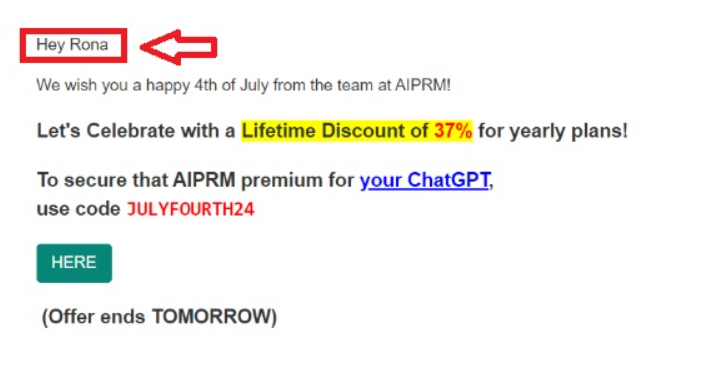
Use Personalization Tokens: Send personalized emails using the recipient’s name and other information.
Behavior-Based Triggers: Send emails to users based on their actions, such as when they buy something or visit your website.
Examples: AIPRMsends a greeting message based on what customers have bought/ subscribed to.
Strategy 2: Clean Your Email List
Email list cleaning removes inactive email addresses and contacts who unsubscribe from your contact list. Maintaining a high-quality list is crucial for improving email delivery and your sender’s reputation. By consistently pruning your list, you guarantee that only engaged and interested subscribers remain, improving open rates and conversions.
How to Implement:
Identify Inactive Subscribers: Use your email marketing strategies tool to monitor engagement metrics and identify subscribers who have not engaged with your emails within a specified timeframe.
Send Re-Engagement Campaigns: Before deleting inactive members, send a re-engagement email to allow them to remain on your list.
Remove Unengaged Contacts: After your re-engagement efforts, remove inactive subscribers to ensure that your list is consistently updated.
Strategy 3: Provide Value Every Time
Keeping your customers interested and engaged is important by regularly offering them value. Emails that provide valuable content are more likely to be opened and read by your audience as they anticipate receiving them in their inbox.
How to Implement:
Understand Your Audience’s Needs: Use analytics or surveys to find out what your customers need and want from you.
Create Valuable Content: Give people useful information like how-to tips, special deals, and personalized suggestions.
Responsive Design: Make use of templates designed to fit various screen sizes.
Short and Concise: Keep your subject lines and content brief and to the point.
Strategy 4: Optimize Your CTAs (Calls-to-Action)
Driving conversions depends critically on your calls to action (CTAs). Whether purchasing, registering for a webinar, or downloading a resource, a strong CTA inspires members to behave as desired.
How to Implement:
Use Action-Oriented Language: Begin with strong command verbs such as “shop,” “buy,” or “download.”
Evoke Emotion: To create a sense of urgency or excitement, say, “Grab your seat—only 5 spots left!”
Be Specific: Clearly specify subscribers’ benefits upon clicking the call-to-action (CTA), such as “view our summer collection.”
Strategy 5: Share User-Generated Content
User-generated content (UGC) is a potent tool for increasing trust and brand recognition. Subscribers who see other customers enjoying your goods are more likely to be interested in your brand.
How to Implement:
Encourage UGC: Have people use your hashtags (#) in their social media posts and ask them to tag you.
Feature UGC in Emails: Send email campaigns using client testimonials, images, and videos.
Build Community: Showcase how people use and enjoy your products to build a sense of community.
Strategy 6: Connect with Social Media
Including social media in your email marketing campaigns helps raise engagement and broaden the brand’s audience.
How to Implement:
Include Social CTAs: Include links from your social media profiles in your newsletters and email campaigns.
Share Email Content on Social Media: Share your email campaigns quickly across social media using tools.
Mailchimp, HubSpot, Hootsuite, Buffer, etc.
Grow Your Email List: Promote your email registration form on social media platforms to attract new subscribers.
Strategy 7: Write Effective Subject Lines
Your email’s subject line is what readers see initially and greatly influences whether or not they open it. Using an interesting subject line can greatly improve the number of people who open your emails.
How to Implement:
Keep it Short: Aim for 50–60 characters to ensure it appears completely.
Use Action-Based Words: Use strong words and clear benefits to get people to read.
Personalize When Possible: People will be more interested if you use user names or other personal information.
Strategy 8: Use Segmentation to Send More Targeted Content
Email list segmentation increases engagement and conversions by enabling you to distribute more pertinent content to various subscriber groups.
How to Implement:
Gather Data: Use signup forms and surveys to gather information about your subscribers.
Create Segments: Sort members according to buying history, interests, behavior, or demographics.
Tailor Content: Send customized emails to each segment’s unique needs and interests.
Strategy 9: Re-Engage Inactive Subscribers
Engaging subscribers who haven’t been active in a while can re-inspire them and push them to become active again. It’s usually a better use of money than acquiring new customers.
How to Implement:
Send Re-Engagement Emails: Don’t forget to remind inactive subscribers how valuable you are and give them special deals or material.
Personalize the Message: Address the subscriber by name and mention their previous interactions with your brand.
Offer Incentives: To encourage repeat business, offer special discounts or bonuses.
Strategy 10: Run Trigger-Based Campaigns
Trigger-based campaigns send automatic emails based on certain subscriber activities. These emails are timely and important, which increases the likelihood of people responding.
How to Implement:
Set Up Triggers: Identify the primary actions initiating communications, including website visits, purchases, or abandoned carts.
Automate Follow-Ups: You can set up your email marketing tool to automatically send follow-up emails when these happen.
Personalize Content: Ensure trigger-based emails provide content relevant to the subscriber’s activities.
Using these 10 must-know email marketing strategies in 2024 will make your campaigns much more effective and yield better results. Personalizing content, making it mobile-friendly, using automation, and focusing on participation can help you stay ahead of the competition and get the most out of your email marketing.
Get more tips and tricks by signing up for our newsletter.
You might be wondering, how can email marketing fuel your overall inbound strategy?
Did you also know that, in the digital age, email marketing continues to reign as one of the most potent tools in a marketer’s toolkit? It’s more than just a virtual communication channel; it’s a powerhouse that can fuel your inbound strategy with remarkable results.
Imagine this: for every $1 spent on email marketing, the average return on investment (ROI) is a staggering $42! If that doesn’t pique your interest, we’ve got a lot more eye-opening facts and insights to share as we delve into the 8 key benefits of integrating email marketing into your inbound strategy. Strap in for a journey that’s bound to transform the way you approach marketing in the digital landscape.
What is Email Marketing?
Email marketing is a digital marketing strategy that involves sending targeted messages or emails to a group of individuals, typically a list of subscribers or customers, with the goal of building and nurturing relationships, promoting products or services, and achieving various business objectives.
What Is Inbound Marketing?
Inbound marketing is a digital marketing methodology and strategy focused on attracting, engaging, and delighting potential customers by providing them with valuable and relevant content at every stage of their buying journey. The key principle of inbound marketing is to pull customers toward your business naturally rather than pushing your products or services onto them aggressively.
How can Email Marketing fuel your overall Inbound Strategy?
Email marketing can fuel your inbound strategy by serving as a highly effective channel for nurturing leads, delivering personalized content, and building long-lasting relationships with your audience. It allows you to provide valuable information and resources at every stage of the customer journey, ultimately driving engagement, conversions, and customer loyalty.
Here are the8 key Benefits of Integrating Email Marketing into your Inbound Strategy
1. Increased Lead Generation
One of the primary advantages of incorporating email marketing into your inbound strategy is its ability to boost lead generation. Unlike traditional outbound marketing methods, email marketing allows you to reach potential customers directly in their inboxes, creating a personal connection. With compelling content and strategically placed calls-to-action (CTAs), you can entice recipients to subscribe, sign up for newsletters, or download valuable resources, thereby expanding your list of leads.
2. Improved Customer Engagement
Email marketing excels in enhancing customer engagement. Through well-crafted email campaigns, you can connect with your audience on a more personal level. By delivering relevant content, such as newsletters, updates, and exclusive offers, you keep your subscribers engaged and informed. Engaged customers are more likely to remain loyal and make repeat purchases.
3. Nurturing and Conversion
Email marketing plays a pivotal role in nurturing leads and guiding them through the conversion funnel. By segmenting your email list based on user behavior and preferences, you can send targeted and highly relevant content. This nurturing process keeps leads warm and gradually moves them closer to making a purchase decision. With strategically timed emails, you can nudge prospects toward taking action, ultimately increasing your conversion rates.
4. Personalization for Better Results
Personalization is a powerful tool in email marketing. It allows you to tailor content to individual subscribers based on their preferences and behaviors. By addressing recipients by their names and offering product recommendations based on their past purchases or browsing history, you can significantly improve email engagement rates. Personalized emails are more likely to capture the recipient’s attention and drive desired actions.
5. Cost-Effective Marketing
Compared to traditional advertising methods, email marketing is highly cost-effective. Creating and sending emails is relatively inexpensive, especially when compared to print advertising or direct mail campaigns. With the right email marketing software, you can automate many aspects of your campaigns, reducing labor costs and improving efficiency. This cost-effectiveness allows businesses of all sizes to leverage email marketing effectively.
6. Analytics and Data Insights
Email marketing provides access to a wealth of data and analytics. You can track metrics such as open rates, click-through rates, conversion rates, and more. These insights provide valuable information about the effectiveness of your email campaigns. By analyzing this data, you can make informed decisions, refine your strategies, and continually improve your inbound marketing efforts.
7. Automation for Efficiency
Email marketing automation is a game-changer for inbound strategy. It enables you to set up automated email workflows that trigger specific emails based on user actions or predefined conditions. For example, you can send a welcome email immediately after someone subscribes, followed by a series of nurturing emails over a few weeks. Automation streamlines your marketing processes, saves time, and ensures that leads receive timely and relevant content.
8. Case Studies and Success Stories
To illustrate the benefits of integrating email marketing into your inbound strategy, let’s look at a real-world example. Take “Company X,” a mid-sized e-commerce business. They decided to revamp their inbound strategy by incorporating email marketing. Over the course of six months, they witnessed a 35% increase in leads generated from email campaigns. Additionally, their email engagement rates skyrocketed by 50%, resulting in a 20% boost in overall conversion rates.
Conclusion
In conclusion, email marketing is a versatile and highly effective tool that can fuel your inbound strategy’s success in numerous ways. From generating leads and improving customer engagement to nurturing prospects and achieving a remarkable ROI, email marketing offers a wide range of benefits. Its personalization capabilities, cost-effectiveness, and automation features make it an indispensable component of any modern inbound marketing strategy.
To learn more about effective email marketing strategies, you can also visit Synergetic Digital.
An inbound email marketing strategy is an approach that focuses on using email as a tool to attract, engage, and delight potential customers. It involves creating and sending relevant and valuable emails to subscribers and leads, with the goal of providing information, solving problems, and nurturing relationships to ultimately drive conversions.
Email is a good marketing strategy because it offers a direct and personalized way to communicate with your audience. It is cost-effective, allows for automation, provides measurable results, and has a high ROI when used effectively. Email marketing helps build trust, engage customers, and drive sales.
Email marketing’s one-to-one communication capabilities make it an ideal tool for nurturing leads and guiding them through the inbound marketing funnel. It allows you to tailor content to individual recipients, deliver targeted messages, and build strong, personalized relationships, which are key elements of a successful inbound strategy.
An example of inbound email marketing is sending a series of educational emails to new subscribers. These emails could include welcome messages, links to valuable blog posts, invitations to webinars, and resources that help subscribers learn more about your products or industry. The goal is to provide value and build trust.
An inbound email marketing strategy is an approach that focuses on using email as a tool to attract, engage, and delight potential customers. It involves creating and sending relevant and valuable emails to subscribers and leads, with the goal of providing information, solving problems, and nurturing relationships to ultimately drive conversions.
Email is a good marketing strategy because it offers a direct and personalized way to communicate with your audience. It is cost-effective, allows for automation, provides measurable results, and has a high ROI when used effectively. Email marketing helps build trust, engage customers, and drive sales.
Email marketing’s one-to-one communication capabilities make it an ideal tool for nurturing leads and guiding them through the inbound marketing funnel. It allows you to tailor content to individual recipients, deliver targeted messages, and build strong, personalized relationships, which are key elements of a successful inbound strategy.
An example of inbound email marketing is sending a series of educational emails to new subscribers. These emails could include welcome messages, links to valuable blog posts, invitations to webinars, and resources that help subscribers learn more about your products or industry. The goal is to provide value and build trust.
Welcome to the Ultimate Guide on How to Start an Ecommerce Business in 2024! If you’ve ever dreamed of quitting your 9-5 job and starting your own business, you’re in the right place. Ecommerce offers a world of opportunities to create a lucrative income, be your own boss, and scale your financial freedom.
Benefits and Opportunities of Starting an Ecommerce Business
The ecommerce industry has been growing exponentially, especially in the wake of the COVID-19 pandemic. Here are some compelling reasons to start an ecommerce business:
Global Reach: Unlike a brick-and-mortar store, an ecommerce business allows you to reach customers globally, opening up vast new markets for your products.
Lower Costs: Operating an online store can be much cheaper than a physical storefront. There’s no rent, fewer staff, and many other cost advantages.
Convenience: Your store is open 24/7, allowing customers to shop at their own convenience, thereby increasing the potential for higher sales.
Easy to Start: With various platforms and tools available, starting an ecommerce business has never been easier. You can literally start a business from your living room.
Overview of the Guide and What It Will Cover
This guide is designed to be a comprehensive, step-by-step manual for starting your ecommerce business. Here’s what we’ll cover:
Finding Your Ecommerce Business Idea: How to research and identify profitable niches and products.
Creating a Business Plan: Setting your business structure, financial goals, and marketing strategies.
Building Your Online Store: Choosing the right platform and designing your website.
Sourcing or Developing Your Products: Where to get your products and how to manage inventory.
Implementing Marketing and Advertising Strategies: Building your brand and attracting customers.
Managing Operations and Customer Service: How to handle payments, fulfill orders, and provide excellent customer service.
Scaling and Growing Your Business: Using data to optimize and expand your business.
Importance of Ecommerce in Today’s Digital Age
Ecommerce is not just a trend; it’s a fundamental shift in the way we conduct business. According to Statista, global ecommerce sales are expected to reach $4.9 trillion by 2021. This makes it more crucial than ever to understand the ins and outs of the ecommerce world.
Finding Your Ecommerce Business Idea
Starting an ecommerce business begins with a solid idea. But how do you find that golden opportunity? In this section, we’ll delve into the strategies for identifying profitable niches, understanding your target audience, and evaluating the feasibility of your business idea.
Researching Trending Products and Niches
The first step in finding your ecommerce business idea is to identify trending products and niches. Here are some ways to do that:
Google Trends: Use Google Trends to see what products or niches are gaining popularity.
Social Media: Platforms like Instagram and Pinterest can be goldmines for discovering trending products.
Competitor Analysis: Look at successful ecommerce stores and see what they are selling.
Pro Tip: Consider seasonal trends and how they might affect your product sales.
Identifying Your Target Audience and Customer Needs
Understanding your target audience is crucial for the success of your ecommerce business. Ask yourself:
Who are the potential customers?
What are their pain points?
What solutions can your products offer?
Table: Customer Persona Example
Age Group
Pain Points
Solutions Offered
18-24
Fast fashion
Affordable apparel
25-34
Quality products
Durable goods
35-44
Convenience
Fast shipping
Evaluating the Feasibility and Profitability of Your Business Idea
Once you’ve identified a potential niche and target audience, it’s time to evaluate the feasibility and profitability. Consider the following:
Market Demand: Is there sufficient demand for your products?
Competition: How saturated is the market?
Profit Margins: Can you source or produce the product at a cost that allows for a healthy profit margin?
Chart: Profit Margin Example
For example, if you sell a product for $100 and it costs $60 to make, your profit margin would be 40%.
Creating an Ecommerce Business Plan
A business plan serves as the roadmap for your ecommerce venture. It outlines your business goals, strategies, and the steps you need to take to achieve them. In this section, we’ll cover how to define your business structure, set financial goals, and outline your marketing and sales strategies.
Defining Your Business Structure and Legal Requirements
Before you can start selling, you need to decide on the legal structure of your business. The most common types are:
Sole Proprietorship: Simplest form, but you’re personally responsible for business debts.
Partnership: Shared responsibility, but make sure to have a legal agreement.
Corporation: More complex, but offers personal liability protection.
Table: Business Structure Comparison
Structure
Liability
Taxation
Complexity
Sole Proprietor
High
Simple
Low
Partnership
Medium
Moderate
Medium
Corporation
Low
Complex
High
Setting Financial Goals and Budgeting for Startup Costs
Financial planning is crucial for the success of your ecommerce business. Consider the following:
Startup Costs: Domain name, hosting, inventory, and marketing.
Ongoing Costs: Maintenance, advertising, and employee salaries.
Revenue Goals: Monthly and yearly revenue targets.
Chart: Sample Startup Costs
Outlining Your Marketing and Sales Strategies
Your business plan should also include a comprehensive marketing strategy. Focus on:
SEO: Optimize your website for search engines to drive organic traffic.
Social Media: Utilize platforms like Facebook and Instagram for advertising.
Email Marketing: Keep your customers engaged with newsletters and promotions.
List: Marketing Tools
Google Analytics
Facebook Ads Manager
Mailchimp for email marketing
Building Your Online Store
Once you have a solid business plan in place, the next step is to actually build your online store. This involves choosing the right ecommerce platform, designing your website, and setting up your product listings.
Choosing the Right Ecommerce Platform
The ecommerce platform you choose will have a significant impact on your business. Here are some popular options:
Shopify: User-friendly and offers a range of plugins.
WooCommerce: Ideal for WordPress users.
Magento: Highly customizable but requires some technical skills.
Table: Ecommerce Platform Comparison
Platform
Ease of Use
Customizability
Cost
Shopify
High
Medium
$$
WooCommerce
Medium
High
$
Magento
Low
Very High
$$$
Designing an Attractive and User-Friendly Website
Your website’s design should not only be visually appealing but also user-friendly. Consider the following:
User Interface: Easy navigation and search functionality.
Mobile Responsiveness: Ensure the site works well on mobile devices.
Loading Speed: Optimize images and scripts to improve loading times.
List: Design Tools
Adobe Photoshop for graphics
Google PageSpeed Insights for speed optimization
Setting Up Product Categories and Listings
Organizing your products into well-defined categories makes it easier for customers to browse your store. Each product listing should include:
High-Quality Images: Multiple angles and zoom functionality.
Detailed Descriptions: Include size, materials, and other relevant details.
Customer Reviews: Allow customers to leave reviews and ratings.
Chart: Essential Elements of a Product Listing
Element
Importance
High-Quality Images
High
Detailed Descriptions
High
Customer Reviews
Medium
Conclusion and Next Steps
Congratulations on making it to the end of this comprehensive guide on starting an ecommerce business! We’ve covered everything from finding a business idea to scaling and growing your ecommerce venture.
Special Offer: Take the Business Ignition Challenge!
If you’re an aspiring business owner who’s unsure about how to start an ecommerce business, we have the perfect solution for you! We invite you to take part in our Business Ignition Challenge offered by Synergetic Digital.
This challenge is designed to guide you through the initial stages of setting up your ecommerce business. From market research to website setup, we’ve got you covered. By the end of the challenge, you’ll have a clear roadmap and actionable steps to kickstart your ecommerce journey.
Don’t miss this golden opportunity to turn your business dreams into reality.
The eCommerce platforms have witnessed significant evolution, with platforms continually adapting to meet the dynamic needs of businesses. As we navigate 2023, several platforms have emerged as leaders in the industry. This guide will explore these top platforms, comparing their features, pricing, and more, to help you make an informed decision for your business.
Shopify
Features: Shopify is renowned for its user-friendly interface, making it ideal for beginners. It offers a range of customizable templates, integrated payment gateways, and robust SEO tools. Its app store is vast, allowing for extensive functionality enhancements.
Pricing: Plans start from $29/month for the Basic Shopify and can go up to $299/month for the Advanced Shopify. Transaction fees are waived if you use Shopify Payments.
WooCommerce
Features: An open-source WordPress plugin, WooCommerce offers deep customization possibilities. It supports unlimited products and has built-in blogging capabilities, enhancing SEO efforts.
Pricing: Being open-source, WooCommerce is free. However, costs can arise from hosting, domain, SSL certificate, and premium plugins.
Magento
Features: Magento, an Adobe company, is a powerhouse for large-scale businesses. It offers unparalleled customization, a vast extension marketplace, and is built for scalability.
Pricing: Magento Open Source is free, but the enterprise version, Magento Commerce, comes with a price tag that varies based on the business size and requirements.
BigCommerce
Features: BigCommerce is known for its built-in features, reducing the need for plugins. It supports multi-channel selling and has a strong focus on mobile shopping experiences.
Pricing: Plans start from $29.95/month for the Standard plan, with the Pro plan costing $299.95/month. Custom pricing is available for enterprises.
Wix eCommerce
Features: Wix is not just a website builder; its eCommerce capabilities have grown significantly. It offers drag-and-drop functionality, making it user-friendly, and supports multiple payment gateways.
Pricing: The Business Basic plan starts at $23/month, with the Business VIP plan priced at $49/month.
Squarespace
Features: Squarespace is not just for its stunning, designer-quality templates. It’s user-friendly and offers integrated payment solutions, inventory management, and unlimited products.
Pricing: The Business plan starts at $18/month, while the Advanced Commerce plan costs $40/month.
PrestaShop
Features: PrestaShop is an open-source platform with a focus on flexibility. It boasts over 300 built-in features and a marketplace of over 3,500 modules and themes.
Pricing: The software is free, but costs can arise from hosting, modules, and templates.
Which ecommerce platforms are best?
Determining the best eCommerce website platform depends on your specific needs and business goals. Some popular options include Shopify, WooCommerce, BigCommerce, Magento, and Wix. Each has its strengths and caters to different types of businesses. To find the best one for you, consider factors like your budget, technical expertise, scalability requirements, and the features you need for your online store.
What is the easiest ecommerce platform to use?
Shopify is often considered one of the easiest eCommerce platforms for beginners. It offers a user-friendly interface, a wide range of customizable templates, and a straightforward setup process. You don’t need extensive technical knowledge to get started with Shopify, making it a popular choice for those new to eCommerce.
What is a popular ecommerce platform?
Some of the most popular eCommerce websites globally include Amazon, eBay, Walmart, Alibaba, and Etsy. These platforms have gained massive user bases and offer a wide variety of products from different sellers, making them go-to choices for online shoppers.
How do I choose the top eCommerce platforms?
To choose the right eCommerce website for your business, follow these steps:
Identify Your Needs: Determine your business requirements, such as the type of products you sell, your budget, and your technical skills.
Research Platforms: Research different eCommerce platforms, considering factors like ease of use, scalability, payment options, and available features.
Try Demos: Take advantage of free trials or demos offered by eCommerce platforms to get a feel for their interface and capabilities.
Consider Your Budget: Evaluate the pricing structure, including transaction fees, monthly subscriptions, and add-on costs.
Check Customization: Assess how customizable the platform is to align with your brand’s look and feel.
Scalability: Ensure the platform can grow with your business as you expand.
Read Reviews: Look for reviews and testimonials from other users to understand their experiences.
Customer Support: Consider the level of customer support and resources provided by the platform.
Security: Verify the platform’s security features to protect your customers’ data.
Payment Options: Confirm that the platform supports the payment methods you plan to offer.
SEO and Marketing: Evaluate the platform’s SEO capabilities and marketing tools.
Compatibility: Ensure it integrates with other tools and software you plan to use.
Making the Right Choice
When selecting an eCommerce platform, it’s essential to consider not just the immediate needs but also the long-term goals of your business. While pricing is a crucial factor, the platform’s features, scalability, community support, and integration capabilities should also play a significant role in your decision.
Business Ignition acts as a strategic partner for eCommerce business owners, guiding them through the platform selection process. It combines in-depth analysis, industry expertise, and a focus on your business objectives to help you make an informed decision on the best platform for your eCommerce business.
In conclusion, 2023 offers a plethora of robust eCommerce platforms, each with its unique strengths. By understanding your business requirements and comparing the features and pricing of these platforms, you can make a choice that will serve as a strong foundation for your online venture.
In the dynamic landscape of business, achieving rapid growth requires more than just luck. It demands a strategic approach that combines innovation, effective management, and a keen understanding of market trends. At Synergetic Digital, we have honed these strategies to perfection, ensuring that your business’s growth trajectory is nothing short of exceptional. In this comprehensive guide, we’ll walk you through our top 10 proven business ignition strategies that are guaranteed to propel your company to new heights.
The foundation of any successful business is a clear understanding of your target market. Business Ignition begins by identifying your niche and determining how your products or services can address their specific needs. Dive into market research to uncover untapped opportunities, study consumer behavior, and discover pain points your business can address effectively. By deeply comprehending your niche, you can tailor your products or services to meet specific needs and stand out in a crowded market.
A unique value proposition (UVP) is the cornerstone of your business’s identity. Craft a compelling UVP that clearly communicates what sets your products or services apart from the competition. Highlight the unique benefits customers will experience by choosing your offerings, ultimately creating a compelling reason for them to engage with your business.
Digital transformation isn’t just a buzzword; it’s a critical component of modern business success. Embrace technology to streamline operations, enhance customer experiences, and expand your reach. Invest in cloud computing, automation, and data analytics as part of your Business Ignition Strategies to stay competitive and agile in an increasingly digital world.
Your brand isn’t just a logo or a tagline; it’s the emotional connection you create with your customers. Invest in a strong brand identity that reflects your values and resonates with your target audience. Consistency in branding across all touchpoints, from your website to social media, fosters trust and loyalty.
Your website is the digital face of your business. Ensure it’s not only user-friendly but also optimized for search engines (SEO). Regularly produce high-quality content that educates and engages your audience while targeting relevant keywords. Utilize social media, email marketing, and online advertising to expand your online reach and attract new customers.
Social media platforms are powerful tools for building and nurturing customer relationships. Develop a comprehensive social media strategy that aligns with your brand’s voice and values. Use social media to engage with your audience, share valuable content, and listen to their feedback and needs.
Collaboration can lead to exponential growth. Network within your industry and seek opportunities for partnerships and collaborations with complementary businesses. These relationships can open new markets, provide access to new customers, and foster innovation
Your customers are the lifeblood of your business. Prioritize their satisfaction and happiness above all else. Implement feedback mechanisms, personalize interactions, and go the extra mile to exceed their expectations. Happy customers become loyal advocates who drive word-of-mouth referrals.
Innovation is the engine that keeps your business competitive. Continuously seek innovative solutions, stay updated on industry trends, and encourage a culture of creativity within your organization. Investing in research and development can lead to breakthrough products or services that propel your growth.
Data is the foundation of informed decision-making. Implement advanced data analytics tools to gather insights, track key performance metrics, and identify areas for improvement. Data-driven decisions lead to better strategies, optimized processes, and, ultimately, rapid growth.
Conclusion
Implementing these ten proven business ignition strategies is a transformative journey that requires dedication, adaptability, and a relentless commitment to excellence. By strategically applying these principles to your unique business context, you can position your company for rapid growth and long-term success.
The timeline for results can vary depending on your industry, market conditions, and the specific strategies you implement. Typically, you can start seeing positive outcomes within several months, but long-term growth is the ultimate goal.
SEO is pivotal, especially in expanding your online presence (Strategy 5). By optimizing your website for search engines and producing high-quality content, you can attract organic traffic, which is often more sustainable and cost-effective.
While not mandatory, networking and collaboration (Strategy 7) can offer unique opportunities for growth, market insights, and resource-sharing. It’s a strategy worth considering, particularly when aligned with your business goals.